
Set up your fitness tracker watch so it can record daily activity, workouts, and supported health measurements. This guide is for first-time users who can install an app and follow basic phone settings. Allow 20-40 minutes for setup; charging may add time. By the end, the watch should be paired with your phone, fitted correctly, and ready to sync its first readings.

Get workout gear delivered free with Prime
- Fast, free delivery on millions of items
- Prime Video, Amazon Music and more included
- Member-only deals all year

Smartwatch with 1.83-Inch HD Touchscreen, Bluetooth Calling, IP68 Water Resistance, and 140+ Sport Modes
- ✔ Display: 1.83-inch IPS touchscreen, 240 × 284 resolution
- ✔ Sports modes: 140+
- ✔ Health tracking: Heart rate, sleep, steps, breath rate, calories, and distance

Fitness Tracker with 1.10-Inch AMOLED Display, Heart Rate and Sleep Tracking
- ✔ Display: 1.10-inch AMOLED touchscreen
- ✔ Heart rate tracking: 24/7
- ✔ Sports modes: 25

ENGERWALL S5 Fitness Tracker with Heart Rate and Sleep Monitoring
- ✔ Brand and model: ENGERWALL S5-Black
- ✔ Sports modes: 16
- ✔ Tracking: Activity, sleep, heart rate, blood oxygen, blood pressure, and body temperature
Difficulty: Beginner | Time: 20-40 minutes, plus charging time if needed
What You’ll Need
Tools & Materials:
- Fitness tracker watch and its charging cable or dock
- Compatible smartphone or tablet
- Manufacturer’s companion app
- Wi-Fi or mobile data and Bluetooth
Knowledge:
- Basic ability to install an app and use Bluetooth settings
- Knowledge of which wrist feels comfortable for daily wear
Check the watch packaging or manufacturer’s support page for compatible phone models and operating system versions. Some watches can be set up without a phone, but features and syncing may be limited. Have your account login ready if the companion app requires one.
Smartwatch with 1.83-Inch HD Touchscreen, Bluetooth Calling, IP68 Water Resistance, and 140+ Sport Modes
For buyers who want a watch to do more than count daily steps, this model offers the lineup’s clearest all-round feature set. Its 140+ sports modes give active users more workout categories to choose from than either the 25-mode AMOLED tracker or the 16-mode ENGERWALL S5. The 1.83-inch IPS touchscreen also provides more room to read activity summaries and notifications, while Bluetooth calling lets us handle calls from the wrist. That makes it the most versatile choice here for people who move between exercise and everyday smartwatch tasks.The larger screen and ABS case are a different fit from the S5’s slim band or the compact AMOLED tracker. The tradeoff is that the watch relies on a phone for GPS, and messages cannot be answered from the device. Its health features cover heart rate, sleep, steps, breath rate, calories, and distance, but the listed information does not establish medical-grade accuracy. Battery life is stated as 5–7 days in daily use, with actual results depending on how features are used. Choose it for its combination of calls, broad activity selection, and easy-to-see display; skip it if phone-free route tracking or a smaller wrist presence is essential.
Pros:
- More than 140 sports modes
- Bluetooth calling and smartphone notifications
- Tracks heart rate, sleep, steps, breath rate, calories, and distance
- Stated daily battery life of 5–7 days
Cons:
- GPS requires a connected smartphone
- Messages cannot be answered from the watch
- Battery life varies with use
Best for: Buyers who want a large, readable screen, Bluetooth calling, and the broadest choice of workout modes in this comparison.
Not ideal for: People who need built-in GPS, want to reply to messages on the watch, or prefer a compact tracker band.
Bottom line: We recommend it as the most versatile pick for buyers who value workout variety and wrist-based calling over compact size or standalone GPS.
“We recommend it as the most versatile pick for buyers who value workout variety and wrist-based calling over compact size or standalone GPS.”
Fitness Tracker with 1.10-Inch AMOLED Display, Heart Rate and Sleep Tracking
This tracker is the middle ground for people who want more visual polish than a basic band without moving to the larger smartwatch. Its 1.10-inch AMOLED touchscreen is compact, and customizable watch faces let us make the display feel more personal. It records heart rate continuously, tracks sleep and activity, and has 25 sports modes—more variety than the S5, though far fewer categories than the 1.83-inch watch. That mix makes it a sensible choice when everyday health tracking matters more than an extensive exercise menu.Alongside notifications, it includes practical extras such as weather updates, hydration and sedentary reminders, remote camera control, and female health tracking. Its stated battery life is up to seven days, and the supplied details list a two-hour charging time. The compromise is shared with both other picks: GPS is connected, so outdoor route tracking requires a phone. The product also says its health measurements are for reference only, which matters if we are choosing a device to guide health decisions. Compared with the ENGERWALL S5, it offers an AMOLED display and more workout modes; compared with the larger smartwatch, it gives up calling and broad mode coverage for a smaller wrist presence.
Pros:
- Compact AMOLED touchscreen with customizable watch faces
- Continuous heart rate and sleep tracking
- 25 sports modes and connected GPS
- Notifications and useful reminders, with up to seven days of stated battery life
Cons:
- GPS requires a paired phone
- Health measurements are for reference only
- Fewer workout modes than the large smartwatch
Best for: Buyers who want a compact touchscreen, continuous heart rate tracking, sleep monitoring, and a few more workout modes than a basic band provides.
Not ideal for: People who need standalone GPS, extensive sport categories, or health readings intended for medical decisions.
Bottom line: We’d choose this as the compact, display-focused option when continuous tracking matters more than calls or a very broad sports menu.
“We’d choose this as the compact, display-focused option when continuous tracking matters more than calls or a very broad sports menu.”
ENGERWALL S5 Fitness Tracker with Heart Rate and Sleep Monitoring
The ENGERWALL S5 is the straightforward choice for buyers who mainly want a slim tracker for routine activity and sleep. It covers heart rate, sleep, and daily activity, with notifications, alarms, and reminders for day-to-day prompts. Its 16 sports modes are enough for a narrower set of common activities, but leave less room to categorize workouts than either the 25-mode AMOLED tracker or the smartwatch with more than 140 modes. That keeps the S5’s role distinct: it favors a band-style approach over extensive workout controls and a large display.It lists IP68 water resistance and up to five to seven days of battery life, and its built-in USB connector avoids carrying a separate charging cable. The description also mentions blood oxygen, blood pressure, and body temperature tracking, but blood pressure monitoring must be enabled in the app; we should treat these readings as general reference information rather than clinical results. The water-resistance guidance specifically rules out hot baths, saunas, and prolonged soaking. Compared with the AMOLED tracker, the S5 has fewer sports modes and no stated AMOLED screen, while the larger smartwatch is the better fit for calls and extensive workout selection. Pick the S5 when a slim form and basic daily coverage matter most.
Pros:
- Slim tracker design for everyday wear
- Tracks activity, sleep, and heart rate
- Provides 16 sports modes and connected GPS
- Built-in USB charging and stated 5–7 days of battery life
Cons:
- Fewer sports modes than the other two picks
- Blood pressure monitoring must be enabled in the app
- Not suitable for hot baths, saunas, or prolonged soaking
Best for: Buyers who prefer a slim band for everyday activity, sleep, and notification tracking, and whose workout routine fits a smaller mode selection.
Not ideal for: People who want a larger, more detailed display, a wide choice of workout modes, or to wear a tracker in hot baths or saunas.
Bottom line: We’d pick the S5 for uncomplicated daily tracking in a slim band, provided its limited workout selection fits our routine.
“We’d pick the S5 for uncomplicated daily tracking in a slim band, provided its limited workout selection fits our routine.”
As an Amazon Associate we earn from qualifying purchases.
Before You Start
Charge the watch before pairing. Keep it near your phone, and allow Bluetooth and any requested app permissions that support the features you plan to use. Health readings and workout estimates are for general wellness and may not be medical measurements. Follow the manufacturer’s guidance for swimming, showering, and cleaning; water resistance varies by model.
Step-by-Step Instructions
Step 1: Charge and power on the watch
Attach the watch to its charging cable or dock, then plug the charger into a suitable power source. Wait until the screen shows a charging indicator. If the watch does not start automatically, press and hold its power or side button according to the instructions for your model.
Tip:Remove any protective film from the back of the watch if the instructions say to do so. A film can interfere with charging or sensor contact.
Check: The screen turns on and shows a battery level or setup prompt.
Step 2: Install the companion app
Open the official app store on your phone, search for the app named by the watch manufacturer, and install it. Check the developer name before downloading so you select the official app. Open it and sign in or create an account if prompted.
Tip:Do not pair the watch from the phone’s Bluetooth settings unless the app’s setup instructions direct you there. Many models complete pairing inside the companion app.
Check: The app opens and displays an option to add, set up, or pair a device.
Step 3: Pair the watch with your phone
Turn on Bluetooth on your phone. In the companion app, choose the option to add a device, then select your watch model from the list. Confirm the pairing code on both screens if one appears. Keep the devices close together and follow prompts to connect to Wi-Fi or install a watch update.
Tip:Keep the watch on its charger during a software update. Do not close the app or restart either device while the update is in progress.
Check: The app identifies the watch as connected and displays its device status or settings.
Step 4: Set your profile and permissions
Enter accurate profile details such as age, height, and weight when requested. These details can affect estimates for distance, calories, and heart rate zones. Choose the units you prefer. Review each permission request and allow access to the phone features needed for functions you want, such as notifications, location for route maps, or health data syncing.
Tip:You can usually change profile details and permissions later in the app or phone settings. Location access may be needed for GPS routes, but not for basic step counting on many models.
Check: Your profile appears in the app, and the features you selected are enabled in its settings.
Step 5: Fit the watch on your wrist
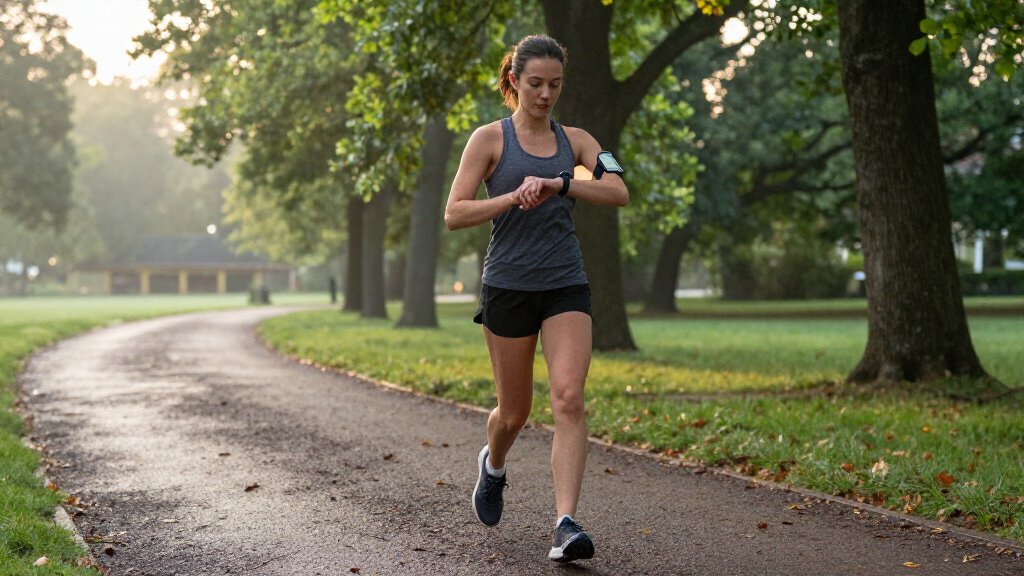
Wear the watch on the wrist you selected in the app, with the display facing up. Position it just above the wrist bone and fasten it snugly enough to prevent sliding, while leaving room for comfortable movement. For workout heart-rate tracking, follow the manufacturer’s fit guidance; the sensor generally needs steady contact with the skin.
Tip:A band that is too loose can produce gaps in heart-rate readings. A band that is too tight can irritate skin or feel uncomfortable. Adjust the fit if you notice pressure, redness, or numbness.
Check: The watch stays in place during ordinary movement, and its sensor rests flat against your skin.
Step 6: Choose what the watch tracks
Open the watch or app settings and review daily activity goals, reminders, sleep tracking, and supported health measurements. Turn on only the features you want to use. Set a realistic step or movement goal, and check how to start and stop a workout on your specific model before exercising.
Tip:Not every tracker measures every metric, and some features need a snug fit or phone connection. Check the model’s guide for supported functions and sensor limitations.
Check: The selected tracking options and activity goal appear in the app or on the watch.
Step 7: Check a reading and sync
Wear the watch for a few minutes and open its activity screen. Walk around, then check whether the step count changes. Open the companion app and refresh or sync if needed. If you want to test workout recording, start a short activity using the watch’s workout controls, then stop and save it.
Tip:GPS routes may take time to acquire a signal outdoors. Some measurements update periodically rather than continuously, so a short wait can be normal.
Check: The watch displays activity data, and the app shows a recent sync or saved workout.
Common Mistakes to Avoid
- Pairing through the phone’s Bluetooth menu before opening the companion app. — Start setup in the manufacturer’s app and use the phone Bluetooth menu only if its instructions request it.
- Wearing the watch too loosely during exercise. — Adjust the band so the sensor maintains comfortable skin contact, and check the fit again before workouts.
- Entering incorrect profile details or selecting the wrong units. — Review age, height, weight, and measurement units in the app before relying on distance or calorie estimates.
- Assuming every metric is exact or available on every model. — Check the watch’s supported features and treat wellness readings as estimates, not a diagnosis.
Troubleshooting
Problem: The watch does not appear in the companion app.
Solution: Confirm Bluetooth is on, charge and wake the watch, and move it close to the phone. Close and reopen the app, then try its add-device flow again. If the watch was paired elsewhere, consult the manufacturer’s instructions for removing the old pairing.
Problem: The app says the watch is connected, but data does not sync.
Solution: Open the app with the phone nearby, check Bluetooth and internet access, and use the app’s sync or refresh control. Check that background activity or battery restrictions are not preventing the app from syncing.
Problem: Heart-rate readings are missing or jump unexpectedly.
Solution: Reposition the watch just above the wrist bone and tighten the band slightly without making it uncomfortable. Clean and dry the sensor and skin. Check the device guide for conditions that can affect readings.
Problem: The watch will not charge or turn on.
Solution: Reseat it on the charger, check that the charging contacts are clean and dry, and try a different compatible power adapter or outlet. Leave it connected for the charging period specified by the manufacturer before trying the power button again.
What Success Looks Like
The watch remains paired with the phone, sits comfortably with consistent sensor contact, and shows changing activity data after movement. The companion app displays a recent sync. If you recorded a test workout, it appears in the app with a time and activity summary. These checks confirm basic setup; they do not validate the medical accuracy of health readings.
Next Steps
Wear the watch consistently for several days to learn its usual activity patterns, then adjust goals to a level you can maintain. Sync it regularly and install updates through the companion app. Clean the band and sensor as the manufacturer directs, and remove the watch if the skin beneath it becomes irritated. Review notifications and permissions occasionally so the watch only shares data and alerts you want.
Frequently Asked Questions
Can I use a fitness tracker watch without a smartphone?
Some models track steps and workouts on the watch itself, but setup, detailed history, updates, or syncing may require a compatible phone. Check the manufacturer’s requirements for your model.
Which wrist should I wear it on?
Use the wrist that feels comfortable and select the same wrist in the companion app if it asks. Consistent placement helps the watch interpret movement data.
Can I wear the watch while swimming or showering?
Only if the manufacturer rates your model for that type of water exposure. Water resistance ratings have limits, and soap, heat, or pressure can affect seals.
Why does the watch show a different step count from my phone?
The devices may use different sensors and counting rules, and they may be worn or carried differently. Check that both are tracking the same time period and that the watch profile is set correctly.
Halloween Picks
halloween
As an affiliate, we earn on qualifying purchases.